Category
- Release Notes

ZEOS Version 24.2.0
Release Date: 19/05/2022
About This Release
Release 24.2.0 brings new features and enhancements to charts, workflow blocks, and chat UI. It also fixes bugs related to dashboards, workflow blocks, guardrail, and chat.
New Features
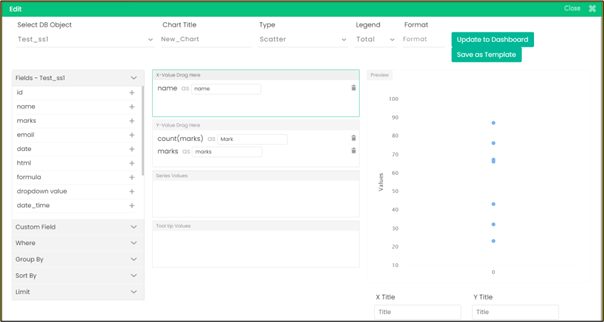
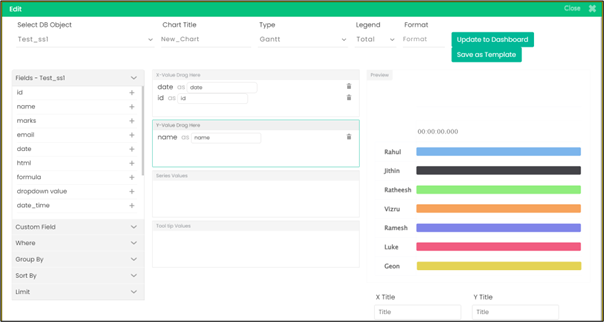
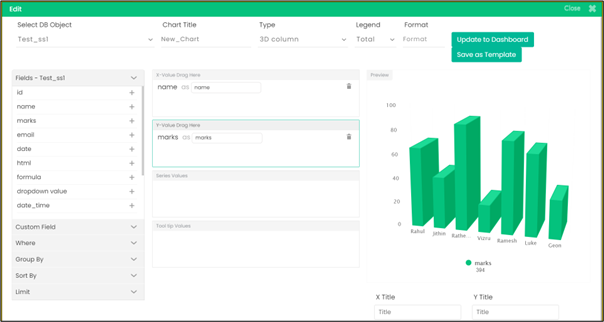
- New Chart Types: You can now create new types of charts such as Pyramid, Scatter, Donut, Semi Donut, 3D Column, 3D Pie, 3D Donut, and Gantt. For all chart types except Gantt and Scatter, you can give string values for the X axis and numeric values for the Y axis.
For Scatter type, you have to give a string value for the X axis and two numeric values for the Y axis. For Gantt chart, you have to give two date values for the X axis and one string or numeric value for the Y axis.
- New Global Permissions: Five new global permissions have been introduced and three have been renamed to customize user roles. They are as follows:
- View Workflows – A user can only view workflows and not edit/delete workflows
- Manage LiveClouds – A user can create and manage LiveClouds
- View LiveClouds – A user can only view LiveClouds and not create/manage LiveClouds
- Manage settings
- Manage App roles
- Guardrailing Apps (previously named Clone apps)
- Manage Global roles (previously named Manage roles)
- Manage Workflows (previously named Manage Data Objects)
- Workflow variable auto suggestion: Now in spreadsheet blocks, on selecting the app and the spreadsheet, you can view the names of spreadsheet columns as a dropdown list.

- Workflow dropdown for background workflow, forms, datalist, and menu builder: You can now search for a workflow by entering two or more characters of the workflow name. This dropdown is available in SS onChange Trigger, Datalist action button, Menu builder workflow, Before save & after save in forms, and Background workflow.


- Notification and chat UI Changes: Two keywords have been introduced to manage workflow notifications, namely groupBy and timeOut.

Use groupBy to group workflow notifications and the notifications are displayed in a separate tab.

Use timeOut to set an auto-hide time for notification. You can set a time (in milliseconds) and the notification is displayed for the defined time period. This is ideal for low priority notifications that do not require any user actions.

- Regulated messages are to be deleted from database permanently.
Bug Fixes
- The issue while guardrailing a dashboard with multiple init rules applied is fixed.
- The issue while applying dashboard rule to hide an element is fixed.
- Bug while uploading a CSV file in Process File block is fixed.
- Form read-only not working for numeric datatype is fixed.
- Custom functions not working in Dashboard Rule block is fixed.
- Search not working for datalist while adding dashboard elements is fixed.
- Added distinct field code in Spreadsheet Filter block row count option.
- Restricted ZEOS workflow edit permission to a normal user on guided tour.
- Characters such as “.” and “/” not getting filtered on datalist search is fixed.
- For today’s date within the Date block, time getting reset to 0 while setting output format as Timestamp is fixed.
- The issue with editing month from the datepicker while editing inline is fixed.
- Form getting opened while clicking “readmore” within a datalist is fixed.
- Notification is enabled on cloning a workflow block as well as on deleting a cloned workflow block.
- Dropdown limit has been removed on dashboard edit.
- Dna filter and livespace owner user id not being passed to init workflow in real-time is fixed.
- Livespace API performance
- A message from chat history can now be deleted using LiveCloud service.
- Progress bar issue with guardrail is fixed.
- If HTML code is given in a Set Variable block, the entire code is now available in workflow log.